
Day 14: Mastering For Loop Control Statements in Python

I'm Archana, pursuing Graduation in Information technology and Management. I'm a fresher with expertise in Python programming. I'm excited to apply my skills in AI/ML learning , Python, Java and web development. Looking forward to collaborating and learning from industry experts.
Introduction :
Welcome back to my Python journey! Yesterday, I laid the foundation with control structures in python.
Today, I dove into control statements, essential building blocks of any programming language. Let's explore what I learned!
Control Statement :
FOR LOOP
c / c++ / java
for ( INITIALIZATION ; CONDITION ; UPDATION )
{
BODY
}
In PYTHON :
() -> :
{} -> INDENTATION
syntax to implement for loop in python :
for x in y :
body

#obj = 10
#obj =2.3
#obj = 4+8j
#obj = True
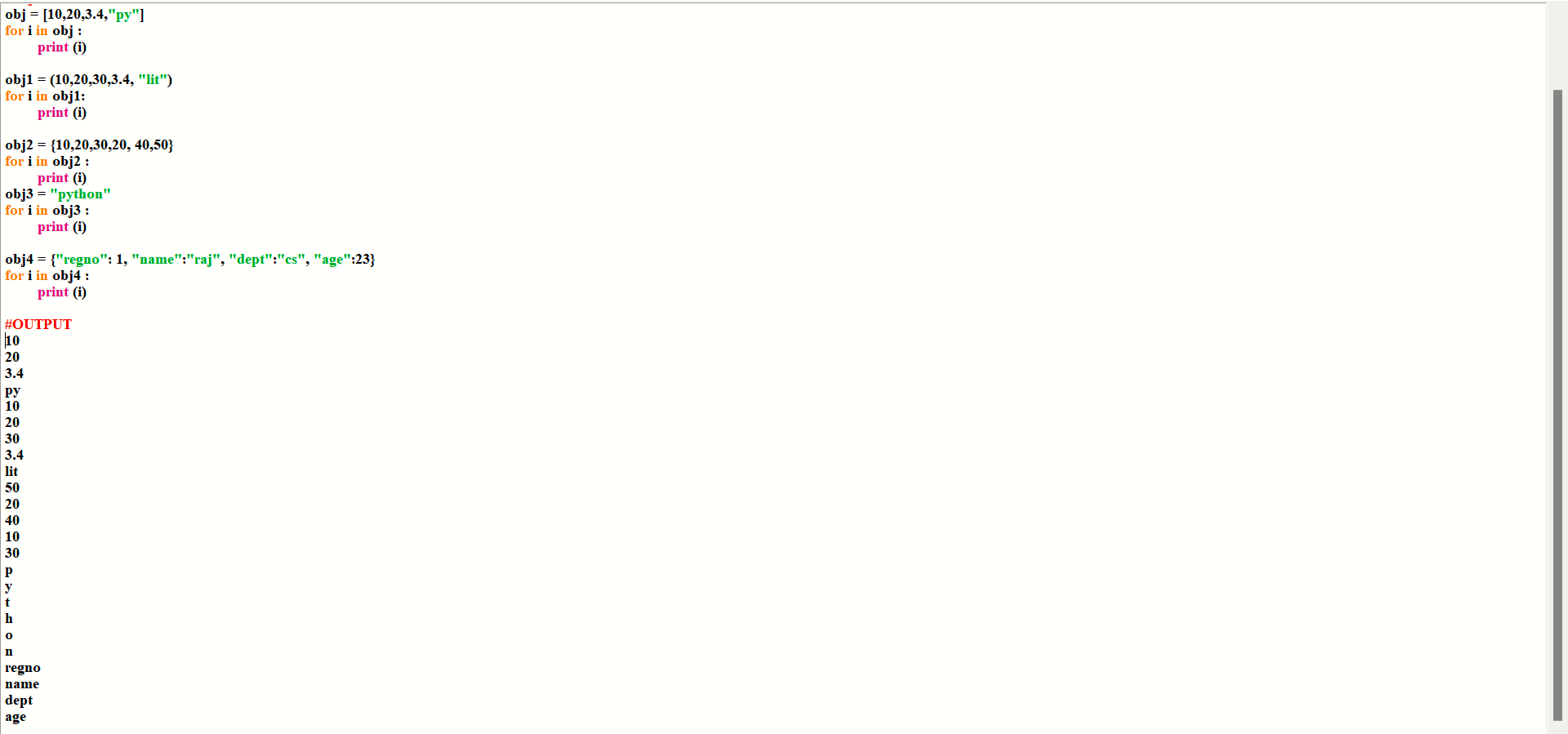
#obj = None obj = [10,20,3.4,"py"]
for i in obj :
print (i)
obj1 = (10,20,30,3.4, "lit")
for i in obj1:
print (i)
obj2 = {10,20,30,20, 40,50}
for i in obj2 :
print (i)
obj3 = "python"
for i in obj3 :
print (i)
obj4 = {"regno": 1, "name":"raj", "dept":"cs", "age":23}
for i in obj4 :
print (i)
RANGE CLASS / RANGE DATA TYPE / RANGE DATA STRUCTURE.
range is a predefined class in python.
. to get the mannuel of range class,
\>>> help ( range )
. we can create the object of range class,
obj = range ( stop ) start = 0 step = 1
obj = range ( start, stop ) step = 1
obj = range ( start, stop, step )
. start will be included but stop will not be included
. start , stop , step param must be int type object.
. range class is used to create a collection of int type object only.
. to get the values of range object we have to implement type conversion
rangeObj = range ( 1, 11, 2 )
print ( list ( rangeObj ) )
. range object supports index mechanism
. +ve index and -ve index is supported with range object.
rangeObj [ index ]
. range is a subscriptable object.
. range is an immutable object.
. range object does not support item assignment or item deletion.
. range object is hashable type object.
ex : #Display all number from 0 to 10
for i in range (10+1):
print (i)
#Display all number from 5 to 20
for i in range (5,20+1):
print (i)
#Display all number from 1 to 20 like 1 3 5 7 9....
for i in range (1,20+1, 2):
print (i)
#wap to display all number between 2 to 200 , from that range make list which number are divided by 3 4 but not 6 with 5, from that find max number , min number & sum of all number & count to number
l =[]
for i in range (2, 200+1):
print (i, end = " ")
if i % 3 == 0 and i % 4 == 0 and i % 5 != 0:
l.append (i)
print ("\n", l, "\n", "max element=", max (l), "\n", "min element=", min (l),"\n", "sum of all element=", sum (l),"\n", "total count =", len (l))

#WAP to take a number as user input from that number find unique number
l =[]
no = int (input ("Enter a number"))
word = str (no)
for i in word :
l.append (i)
print (set(l))

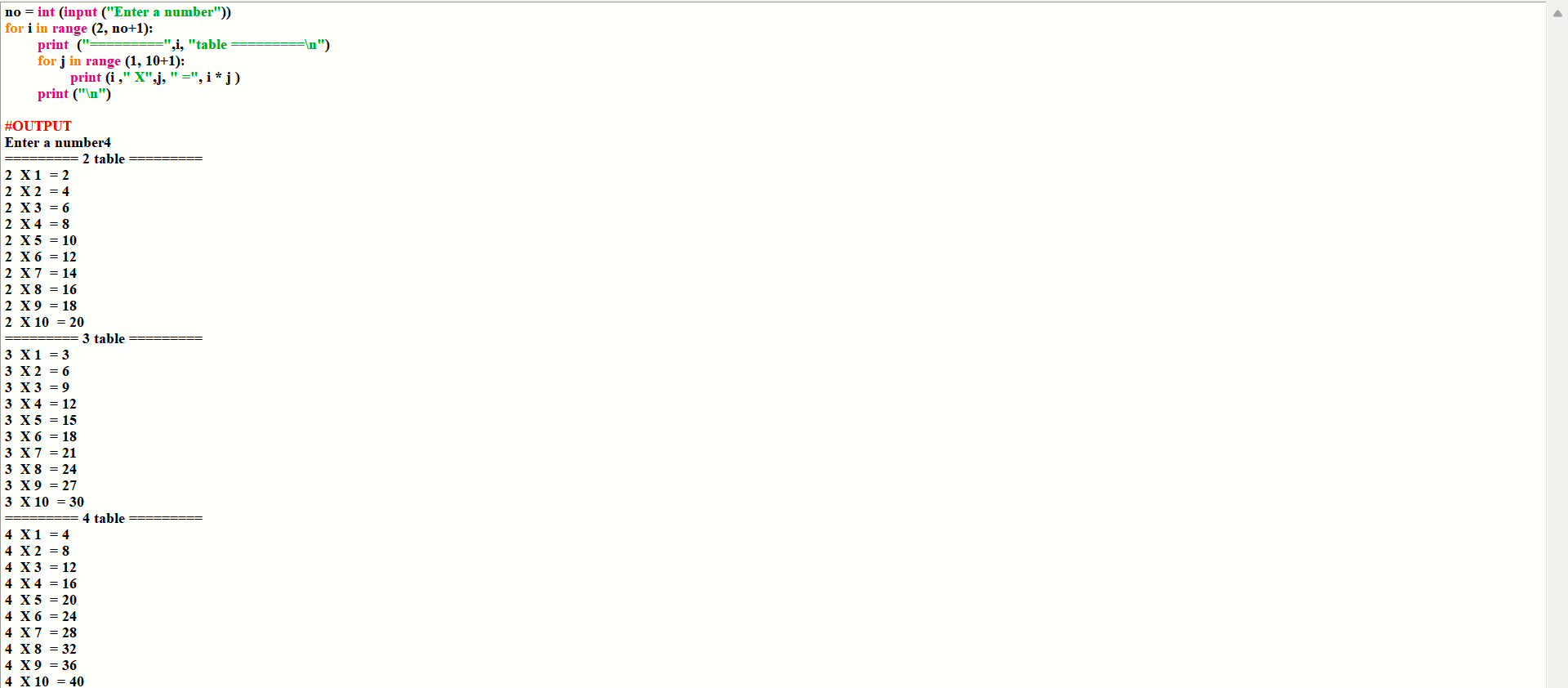
#WAP to take a number as user input from starting as ‘2’ to that random number, get the numeric table
no = int (input ("Enter a number"))
for i in range (2, no+1):
print ("=========",i, "table =========\n")
for j in range (1, 10+1):
print (i ," X",j, " =", i * j )
print ("\n")
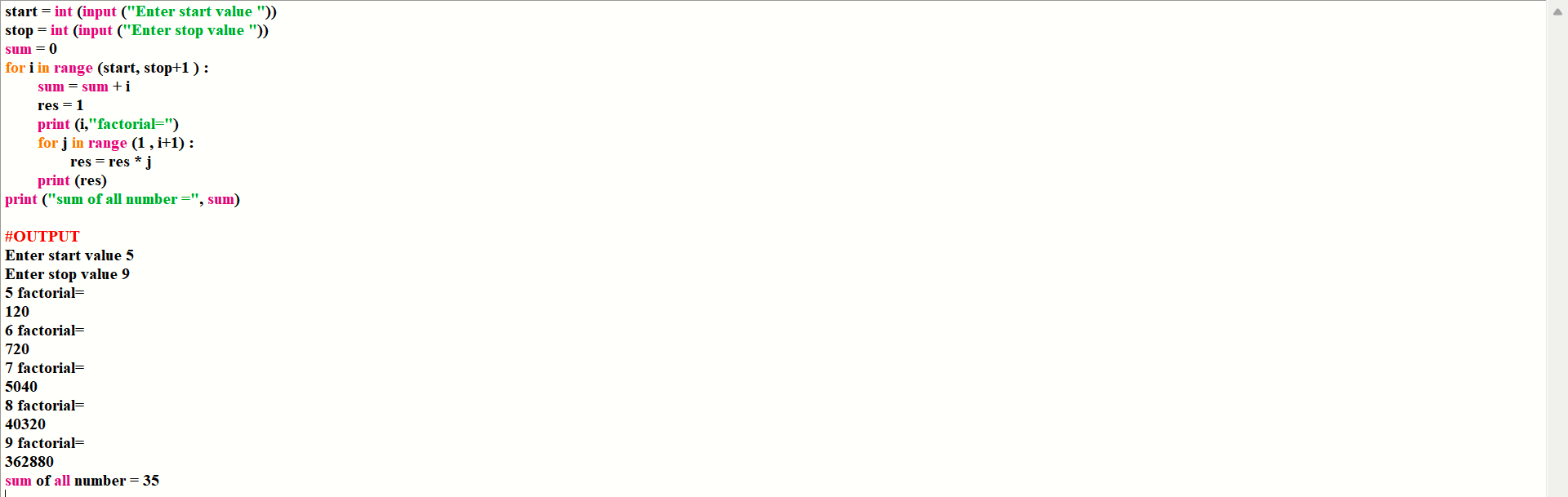
#Wap to display sum of all number between a range , from that range find factorial of all numbers
start = int (input ("Enter start value "))
stop = int (input ("Enter stop value "))
sum = 0
for i in range (start, stop+1 ) :
sum = sum + i
res = 1
print (i,"factorial=")
for j in range (1 , i+1) :
res = res * j
print (res)
print ("sum of all number =", sum)
Challenges :
Understanding loop iteration.
Handling errors.
Resources :
Official Python Documentation: Control Structures
W3Schools' Python Tutorial: Control structures
Scaler's Python Course: Control Flow
Goals for Tomorrow :
Explore something more on command_line arguments.
Conclusion :
Day 14’s a success!
What are your favorite Python resources? Share in the comments below.
Connect with me :
GitHub: [ https://github.com/p-archana1 ]
LinkedIn : [ https://www.linkedin.com/in/archana-prusty-4aa0b827a/ ]
Join the conversation :
Share your own learning experiences or ask questions in the comments.
HAPPY LEARNING!!
THANK YOU!!


